In a world of multi-megabyte monolithic applications like Microsoft Office and Adobe Photoshop, it's easy to get the impression that the programs you run need to be huge and complex to actually do any real work. You need lots of options, lots of bells and whistles, and huge multi-screen supporting windows of content, right?
Perhaps not.
Until recently, I'd thought of widgets (those always-ready little "applets" that run in a Mac's dashboard, Windows Sidebar or Yahoo! Widgets) as curious little programs that basically helped me get easy access to the time, weather, phases of the moon, and my calculator.
Then someone showed me a widget for Quicken. And one for Skype. And one for Wikipedia. Then I discovered widgets that work on mobile phones (like my Treo smartphone). Wow. I realized that to enter a simple transaction in Quicken, I didn't have to wait for the program to launch, navigate to the account listing and enter. To make a SKYPE call, I just need to press F8, or to see where that earthquake I just felt originated... well you get the drift.
Current widgets are mostly information or entertainment oriented, with a few biz widgets. I found most of them on Apple's site, but there are plenty more on Yahoo! and other places.
I'm hoping that these little buddies become even more prevalent and that we see the invention of widgets that help us quickly access tools for education, like gradebooks and discipline tool or students management systems.
Once these are out, I'll pop all of them on my Apple iPhone (we can dream) and I'll be good to go!
Wednesday, June 13, 2007
Friday, April 06, 2007
Are Ed Tech Conferences Really Worthwhile?
I've been in the education biz, either as a full-time educator or as someone working with schools and districts, since 1980. That's more than 20 years of opportunity to attend and present at education conferences. So, are they really worth the time off, travel, and expense?
As an educator, it's very easy for us to feel (and be) isolated from the world of technology. Sure we regularly interact with our peers, and perhaps local/district technology coordinators or IT administrators. But are we really getting the most out of the technology we have? Education conferences go a long way to bridging the knowledge gap and the isolation gap - connecting us with others. They help us discover and explore new technologies and help us meet our own (personal) learning goals. I think they're great.
I have attended, and been a presenter at local, state, national and international technology conferences. Each of these conference types offer different opportunities for learning and collaboration.
NECC, the grandest of the all, is the ultimate opportunity to go WORLDWIDE to find out what's new and what other schools and educators are doing. In addition to a host of vendors, the workshops are exceptional. There is nowhere else where you'll be able to explore such a diversity of well-presented topics. If you only attend ONE conference, NECC (National Educational Computing Conference) is the place to go. This summer's conference is in Atlanta, GA.
State conferences are a great choice if out-of-state travel is restricted or you want a more "people-centered" approach. Workshops tend to be more "real world" and often help you navigate the idiosyncracies of purchasing and using technology in your own state.
Five state conferences, FETC (Florida), TCEA (Texas), CECA (Connecticut), GaETC (Georgia) and CaliforniaCUE (California) are particularly good at drawing larger crowds and offering excellent speakers and workshops.
Local conferences can be good, although you'll mostly (obviously) hear what you might already know. If the conference organizers are on top of things, they'll mix things up by offering local presenters as well as "experts" from other districts.
Overall, conference attendance has been very erratic. As the Web offers more resources and budgets downsize, some choose to stay home. While the WEb is a great resource for information, there just isn't any comparison to roaming the halls of a conference and spotting "unexpected gems" or running into friends or making new ones.
If you haven't tried attending an EdTech conference, you should. If you're an attendee, try presenting next time. It's a blast - so is the lifelong learning experience you'll get from the effort.
By the way, looking for a keynote speaker or featured workshop? Shoot me an email!
As an educator, it's very easy for us to feel (and be) isolated from the world of technology. Sure we regularly interact with our peers, and perhaps local/district technology coordinators or IT administrators. But are we really getting the most out of the technology we have? Education conferences go a long way to bridging the knowledge gap and the isolation gap - connecting us with others. They help us discover and explore new technologies and help us meet our own (personal) learning goals. I think they're great.
I have attended, and been a presenter at local, state, national and international technology conferences. Each of these conference types offer different opportunities for learning and collaboration.
NECC, the grandest of the all, is the ultimate opportunity to go WORLDWIDE to find out what's new and what other schools and educators are doing. In addition to a host of vendors, the workshops are exceptional. There is nowhere else where you'll be able to explore such a diversity of well-presented topics. If you only attend ONE conference, NECC (National Educational Computing Conference) is the place to go. This summer's conference is in Atlanta, GA.
State conferences are a great choice if out-of-state travel is restricted or you want a more "people-centered" approach. Workshops tend to be more "real world" and often help you navigate the idiosyncracies of purchasing and using technology in your own state.
Five state conferences, FETC (Florida), TCEA (Texas), CECA (Connecticut), GaETC (Georgia) and CaliforniaCUE (California) are particularly good at drawing larger crowds and offering excellent speakers and workshops.
Local conferences can be good, although you'll mostly (obviously) hear what you might already know. If the conference organizers are on top of things, they'll mix things up by offering local presenters as well as "experts" from other districts.
Overall, conference attendance has been very erratic. As the Web offers more resources and budgets downsize, some choose to stay home. While the WEb is a great resource for information, there just isn't any comparison to roaming the halls of a conference and spotting "unexpected gems" or running into friends or making new ones.
If you haven't tried attending an EdTech conference, you should. If you're an attendee, try presenting next time. It's a blast - so is the lifelong learning experience you'll get from the effort.
By the way, looking for a keynote speaker or featured workshop? Shoot me an email!
Friday, March 16, 2007
Web 2.0 - In Education?
The term "Web 2.0" generally refers to a bunch of web-based services—such as blogs (like this), social networking sites (like MySpace), wikis (like Wikipedia), social bookmarking (like del.icio.us), communication tools (like AIM and Google Chat), and other collaborative environments on the web (like Second Life) that encourge sharing.
It's a convenient term, although, really, it doesn't really represent the second generation of the Web. That honor probably goes to the Internet2 initiative - which is all about the backbone and infrastructure of how we send and receive information.
So is this collection of web-based services and tools useful in education? Yes, with the obligatory qualifications.
Web 2.0 Tools in Action...
The "i" generation moving through schools today are as connected with the Web as they are (and were) with video games, DVD, and their iPod. Students (and the rest of us) are posting to blogs (weblogs) at record numbers. The graph of growth looks like every stockbroker's dream ("up sharply and to the right") with more than 100,000 blogs created every day. (Technorati)
In the classroom, blogs are popping up to support curriculum - students writing about topics they're studying and then offering opportunity for comment from their peers around the world. Teachers are using blogs as examples of good (and not so good) writing. Administrators are blogging with information for their community. A quick search of Blogger for "education" or "school" and you might be surprised.
Photo and video sharing is also soaring like a NASA rocket. Media sharing sites like Flikr, Sharpcast, Picasa, and YouTube not only capture the media's attention, they're capturing your eyeballs at record rates. For education, these sites represent an amazing opportunity to produce and share content useful in support of teaching and learning.
Podcasting is another rapidly growing activity. A survey by eMarketer suggests that there are about 20M podcasts out there today (in 2007) with that number tripling by 2010. Education podcasts are growing, too. More teachers and students are sharing information, supporting curriculum, and reporting everything from field trip results to school lunch menus via podcasts.
Sometimes the content shared is as simple (and complex) as a list of your favorite links to other Web 2.0 services. Bookmarking sites such as Del.icio.us, blinklist, shadows and clipmarks and mashups like Bloglines bring easy access to favorite resources across the web. The cool thing about these services is that they connect and collect resource lists.
Another element of the universe known as Web 2.0 are web applications that are stored and run from the web. Think of running Microsoft Word via the web, rather than clicking an icon on your desktop. Sites like Google Docs, writely, writeboard, and rallypoint let you and your students write collaboratively; GoogleSpreadsheets gets your numbers online; to-do lists like voo2do, Ta-Da Lists are interesting, and news collaborative systems like digg, diggdot and gabbr. Even project management sites like Basecamp and CentralDesktop might be useful.
In education, the power of the applications is the same as the power of the apps for other uses. The tools offer a common platform for work (no more "I've got a Mac, you've got a PC), an easily accessible collaborative environment, and some very powerful, and mostly free, tools.
Education-focused tools are becoming more common, too. For schools, there are concept mapping apps liek gliffy and stu.dicio.us. It's only a matter of time before more education apps become available this way.
Web 2.0 represents yet another compelling reason to learn more about what's on the Internet and how to use it in schools. It's not about using these tools because they're there, of course, it's about using the tools because they expand or enhance the process of teaching and learning. As with any technology tool, it's all about the ability of the educator to embrace the technology, understand the use of the technology, and get creative about the use of these tools with students, peers and community.
In a few years we'll look back at the emergency of these tools as another significant benchmark in the growth of the Net - and, hopefully, a sea-change in how schools use technology in the classroom.
It's a convenient term, although, really, it doesn't really represent the second generation of the Web. That honor probably goes to the Internet2 initiative - which is all about the backbone and infrastructure of how we send and receive information.
So is this collection of web-based services and tools useful in education? Yes, with the obligatory qualifications.
Web 2.0 Tools in Action...
The "i" generation moving through schools today are as connected with the Web as they are (and were) with video games, DVD, and their iPod. Students (and the rest of us) are posting to blogs (weblogs) at record numbers. The graph of growth looks like every stockbroker's dream ("up sharply and to the right") with more than 100,000 blogs created every day. (Technorati)
In the classroom, blogs are popping up to support curriculum - students writing about topics they're studying and then offering opportunity for comment from their peers around the world. Teachers are using blogs as examples of good (and not so good) writing. Administrators are blogging with information for their community. A quick search of Blogger for "education" or "school" and you might be surprised.
Photo and video sharing is also soaring like a NASA rocket. Media sharing sites like Flikr, Sharpcast, Picasa, and YouTube not only capture the media's attention, they're capturing your eyeballs at record rates. For education, these sites represent an amazing opportunity to produce and share content useful in support of teaching and learning.
Podcasting is another rapidly growing activity. A survey by eMarketer suggests that there are about 20M podcasts out there today (in 2007) with that number tripling by 2010. Education podcasts are growing, too. More teachers and students are sharing information, supporting curriculum, and reporting everything from field trip results to school lunch menus via podcasts.
Sometimes the content shared is as simple (and complex) as a list of your favorite links to other Web 2.0 services. Bookmarking sites such as Del.icio.us, blinklist, shadows and clipmarks and mashups like Bloglines bring easy access to favorite resources across the web. The cool thing about these services is that they connect and collect resource lists.
Another element of the universe known as Web 2.0 are web applications that are stored and run from the web. Think of running Microsoft Word via the web, rather than clicking an icon on your desktop. Sites like Google Docs, writely, writeboard, and rallypoint let you and your students write collaboratively; GoogleSpreadsheets gets your numbers online; to-do lists like voo2do, Ta-Da Lists are interesting, and news collaborative systems like digg, diggdot and gabbr. Even project management sites like Basecamp and CentralDesktop might be useful.
In education, the power of the applications is the same as the power of the apps for other uses. The tools offer a common platform for work (no more "I've got a Mac, you've got a PC), an easily accessible collaborative environment, and some very powerful, and mostly free, tools.
Education-focused tools are becoming more common, too. For schools, there are concept mapping apps liek gliffy and stu.dicio.us. It's only a matter of time before more education apps become available this way.
Web 2.0 represents yet another compelling reason to learn more about what's on the Internet and how to use it in schools. It's not about using these tools because they're there, of course, it's about using the tools because they expand or enhance the process of teaching and learning. As with any technology tool, it's all about the ability of the educator to embrace the technology, understand the use of the technology, and get creative about the use of these tools with students, peers and community.
In a few years we'll look back at the emergency of these tools as another significant benchmark in the growth of the Net - and, hopefully, a sea-change in how schools use technology in the classroom.
Wednesday, February 28, 2007
What is a webinar and does it hurt?
It's easy to feel like the train is constantly leaving the technology station without you. In a world where convergence, interoperability and new media have moved from buzz words to the general lexicon, staying on top of the latest technologies is a real challenge - even for a person working in the industry - and, like me, writing about technology.
I'm constantly scanning the net for the latest podcasts, current technology news delivered via RSS and reading blogs. It can easily feel all-consuming. Enter the webinar.
I don't know about you, but my learning style changes based on content, urgency and my present state of mind. When I'm feeling like I just can scan another blog or navigate another labyrinthine news site - I start looking for ways to learn that "push" the information to me in nice, focused chunks. I've discovered, somewhat to my surprise, that I like to learn via webinars. A webinar is a web-based seminar. You log into a web site, dial a toll-free number for an accompanying audio track delivered via conference call, and kick back and learn.
The best webinars won't let my attention stray either. New tools allow hosts to "see" your activity (they can monitor whether you've got the webinar app in front or whether you've strayed off) and they constantly ask questions (polls) to keep people attentive.
I've attended webinars on topics as mundane as "Windows Vista Security" to as exciting as "Apple's iPhone - The Next Toaster". I like the fact that I can hear experts in the field speaking and that I can read at the same time - and I can do it all while in my comfy jeans and t-shirt - no suit and tie.
From consumer to producer
Ever the glutton for stress-based learning, I signed on with my friends at ISTE to present, then host, a new webinar series aimed at sharing new and emerging technologies with educators. The series, entitled "Technology in Practice" offered me an opportunity to get behind-the-scenes with the webinar tools, and experience what it was like to present.
Now I've got a bunch of webinars under my belt. I've learned much. My old "For Dummies author" kicks and and I'd like to offer my TOP TEN TIPS for conducting an effective and exciting webinar of your own.
Top 10 Webinar Tips
Plan
Like creating a lesson plan for your class, having a plan for what you’ll cover in your webinar is essential. Take the time to break the time down into blocks of content and make an outline about what you’ll cover and approximately how much time you’ll spend on each issue. You probably don’t need a script (you don’t want to sound like you’re reading), but a detailed outline can help you be more comfortable and ensure you reach your content objectives.
Speak slowly
People speak more quickly when they’re nervous, or feel like they’re under time pressure. Speaking too quickly is the most frequent mistake made when delivering webinar content. So, speak at your regular rate (unless you’re an auctioneer) and take a breath now and then. Practice a bit on an audio recorder so you can hear how fast you’re speaking and slow down!
Relax
You know what you’re talking about. Your audience is eager to hear your nuggets of wisdom. There’s every reason for you to be comfortable speaking to the “online class”. It’s just like teaching – only the smiling faces are hundreds of miles away.
Create a reasonable, concise and relevant presentation
The presentation both serves as an organizer for your topic and a way to share graphical and textual information with your audience. The presentation should be long on content and short on words, visually interesting (read: use illustrations where they are appropriate) and flow well. You should use a template to ensure your slides follow similar look and feel. You should also plan no more than 1 slide for every 2 minutes of presentation time. This'll help you keep focused. If you're a "rapid speaker", you might be able to squeeze that time a bit.
Mix it up (flow)
Nobody wants to hear anyone drone on for an hour on any topic. With webinars, the attention span is very short since you’re not physically in the room with the attendees. That means you should mix-up your delivery – interacting with the host, and offering “interspersed organizational hints”, like “That’s the story on finding podcasts, now I’ll talk a bit about creating your own podcasts”.
Poll
Webinar systems allow you to create an interactive online poll. This helps you find out more about your audience, and, more importantly, keep them engaged. Prepare you poll questions in advance (the system requires it) and use them judiciously. Create a few questions that can be used to break the flow, and a few to be used to check audience attention or knowledge of your topic. Stay away from poll questions that don’t relate to your topic. Stay way from poll questions that are sarcastic or provocative. You’ll be glad you did.
Practice
It’s strange to sit at your phone and talk to a bunch of strangers. It’s a good idea to practice by creating an outline and working with your host to try out some of your ideas via phone – just like you’ll be doing when you conduct the webinar. A telephone headset helps a HUGE amount – as it cuts background noise and leaves your hands free to type (you can chat with the host while you’re talking- behind the scenes, via the Webinar engine’s chat feature).
Know how to mange the interface
With some webinars, you’ll have the luxury of a knowledgeable host and support staff who will control the technical issues – including muting or unmuting participants, managing the poll questions, keep you on track if you go on too long, or help you fill silence if you need help. If you're on your own, though, you'll need to learn how to do these things (less complicated than they sound). If you CAN corral a friend or colleague to host, though, things will feel like they flow more smoothly.
Know your audience
As with any instructional method, you should know your audience. With most educational technology webinars, your audience tends to be highly aware of technology in general, but not necessary the specifics of the technologies you’re addressing. Structure your Powerpoint presentation in a way that speaks at the educational level of your audience and doesn’t assume, as with your classroom, that all learners are at the same educational level about your topic.
Be enthusiastic
Don’t be afraid to “turn up the dial” on enthusiasm when you are presenting. Think “revival” and not “school announcements over the PA system”. The more animated you are in your speech, the better attention you’ll get and the better reaction your audience will have to your presentation.
Off to plan the next webinar!
Cheers,
Bard
I'm constantly scanning the net for the latest podcasts, current technology news delivered via RSS and reading blogs. It can easily feel all-consuming. Enter the webinar.
I don't know about you, but my learning style changes based on content, urgency and my present state of mind. When I'm feeling like I just can scan another blog or navigate another labyrinthine news site - I start looking for ways to learn that "push" the information to me in nice, focused chunks. I've discovered, somewhat to my surprise, that I like to learn via webinars. A webinar is a web-based seminar. You log into a web site, dial a toll-free number for an accompanying audio track delivered via conference call, and kick back and learn.
The best webinars won't let my attention stray either. New tools allow hosts to "see" your activity (they can monitor whether you've got the webinar app in front or whether you've strayed off) and they constantly ask questions (polls) to keep people attentive.
I've attended webinars on topics as mundane as "Windows Vista Security" to as exciting as "Apple's iPhone - The Next Toaster". I like the fact that I can hear experts in the field speaking and that I can read at the same time - and I can do it all while in my comfy jeans and t-shirt - no suit and tie.
From consumer to producer
Ever the glutton for stress-based learning, I signed on with my friends at ISTE to present, then host, a new webinar series aimed at sharing new and emerging technologies with educators. The series, entitled "Technology in Practice" offered me an opportunity to get behind-the-scenes with the webinar tools, and experience what it was like to present.
Now I've got a bunch of webinars under my belt. I've learned much. My old "For Dummies author" kicks and and I'd like to offer my TOP TEN TIPS for conducting an effective and exciting webinar of your own.
Top 10 Webinar Tips
Plan
Like creating a lesson plan for your class, having a plan for what you’ll cover in your webinar is essential. Take the time to break the time down into blocks of content and make an outline about what you’ll cover and approximately how much time you’ll spend on each issue. You probably don’t need a script (you don’t want to sound like you’re reading), but a detailed outline can help you be more comfortable and ensure you reach your content objectives.
Speak slowly
People speak more quickly when they’re nervous, or feel like they’re under time pressure. Speaking too quickly is the most frequent mistake made when delivering webinar content. So, speak at your regular rate (unless you’re an auctioneer) and take a breath now and then. Practice a bit on an audio recorder so you can hear how fast you’re speaking and slow down!
Relax
You know what you’re talking about. Your audience is eager to hear your nuggets of wisdom. There’s every reason for you to be comfortable speaking to the “online class”. It’s just like teaching – only the smiling faces are hundreds of miles away.
Create a reasonable, concise and relevant presentation
The presentation both serves as an organizer for your topic and a way to share graphical and textual information with your audience. The presentation should be long on content and short on words, visually interesting (read: use illustrations where they are appropriate) and flow well. You should use a template to ensure your slides follow similar look and feel. You should also plan no more than 1 slide for every 2 minutes of presentation time. This'll help you keep focused. If you're a "rapid speaker", you might be able to squeeze that time a bit.
Mix it up (flow)
Nobody wants to hear anyone drone on for an hour on any topic. With webinars, the attention span is very short since you’re not physically in the room with the attendees. That means you should mix-up your delivery – interacting with the host, and offering “interspersed organizational hints”, like “That’s the story on finding podcasts, now I’ll talk a bit about creating your own podcasts”.
Poll
Webinar systems allow you to create an interactive online poll. This helps you find out more about your audience, and, more importantly, keep them engaged. Prepare you poll questions in advance (the system requires it) and use them judiciously. Create a few questions that can be used to break the flow, and a few to be used to check audience attention or knowledge of your topic. Stay away from poll questions that don’t relate to your topic. Stay way from poll questions that are sarcastic or provocative. You’ll be glad you did.
Practice
It’s strange to sit at your phone and talk to a bunch of strangers. It’s a good idea to practice by creating an outline and working with your host to try out some of your ideas via phone – just like you’ll be doing when you conduct the webinar. A telephone headset helps a HUGE amount – as it cuts background noise and leaves your hands free to type (you can chat with the host while you’re talking- behind the scenes, via the Webinar engine’s chat feature).
Know how to mange the interface
With some webinars, you’ll have the luxury of a knowledgeable host and support staff who will control the technical issues – including muting or unmuting participants, managing the poll questions, keep you on track if you go on too long, or help you fill silence if you need help. If you're on your own, though, you'll need to learn how to do these things (less complicated than they sound). If you CAN corral a friend or colleague to host, though, things will feel like they flow more smoothly.
Know your audience
As with any instructional method, you should know your audience. With most educational technology webinars, your audience tends to be highly aware of technology in general, but not necessary the specifics of the technologies you’re addressing. Structure your Powerpoint presentation in a way that speaks at the educational level of your audience and doesn’t assume, as with your classroom, that all learners are at the same educational level about your topic.
Be enthusiastic
Don’t be afraid to “turn up the dial” on enthusiasm when you are presenting. Think “revival” and not “school announcements over the PA system”. The more animated you are in your speech, the better attention you’ll get and the better reaction your audience will have to your presentation.
Off to plan the next webinar!
Cheers,
Bard
Wednesday, January 17, 2007
The death of handhelds in education? NOT.
Over the past week, I've had a couple of experiences that really gave me some perspective on what's happening with handheld devices, and what's happening in educational technology.
Last Wednesday, I attended Macworld and worshipped at the Apple's iPhone shrine. I saw the iPhone, perched on a rotating column and sealed in a plastic dome. I watched presentations. I talked with Apple employees and local educators.
It's pretty impressive. They took the idea of a smartphone and made it better and, certainly, more user-friendly. The took convergence to a new level.
Will iPhone make in-roads in education? Probably. Despite the hefty price and single-carrier configuration, it's a sensible tool for administrators - especially for email. What it does NOT do that a not-as-flashy Treo or Palm handheld does is run thousands of education-related software programs. While the iPhone is based on Mac OS X, it is NOT Mac OS X - that is, you can't just take your desktop programs and run them on your iPhone. That means access to your student information system, digital forms compatible with MS Office, attachable probeware, IEP managers, gradebooks, etc. - a staple on Palm OS devices - won't run on iPhone. Of course, Apple's not stupid. They'll likely spawn another "iPhone econonomy" where you'll eventually see some widgets or other programs useful for these tasks.
Advantage: PalmOS smartphones and handhelds.
Second, I delivered a webinar for ISTE entitled "Top 10 Tips and Techniques for Using Handhelds and Smartphones in Education" to a whole bunch of enthusiastic educators, technology coordinators, and other teaching and learning professionals. The questions confirmed the fact that district are just now adopting handheld technology in the classroom and are deploying email-ready smartphones in record numbers. The interest in HANDHELDS is huge and as educators find out they're much more than a "PDA", they'll understand how the devices can help with equity and enhance instruction in so many ways. Smartphones came up, but most realized that it's not the TELEPHONE that matters, it's all the other things the operationg system (Palm OS) can do.
Advantage: PalmOS smartphones and handhelds.
There are lots of smartphones - more on the way - but handhelds won't die. The idea of a low-cost, high function, easy to support device is really compelling especially in the education marketplace. Will handhelds go away, probably not
Some helpful links:
iPhone
ISTE Webinars
Last Wednesday, I attended Macworld and worshipped at the Apple's iPhone shrine. I saw the iPhone, perched on a rotating column and sealed in a plastic dome. I watched presentations. I talked with Apple employees and local educators.
It's pretty impressive. They took the idea of a smartphone and made it better and, certainly, more user-friendly. The took convergence to a new level.
Will iPhone make in-roads in education? Probably. Despite the hefty price and single-carrier configuration, it's a sensible tool for administrators - especially for email. What it does NOT do that a not-as-flashy Treo or Palm handheld does is run thousands of education-related software programs. While the iPhone is based on Mac OS X, it is NOT Mac OS X - that is, you can't just take your desktop programs and run them on your iPhone. That means access to your student information system, digital forms compatible with MS Office, attachable probeware, IEP managers, gradebooks, etc. - a staple on Palm OS devices - won't run on iPhone. Of course, Apple's not stupid. They'll likely spawn another "iPhone econonomy" where you'll eventually see some widgets or other programs useful for these tasks.
Advantage: PalmOS smartphones and handhelds.
Second, I delivered a webinar for ISTE entitled "Top 10 Tips and Techniques for Using Handhelds and Smartphones in Education" to a whole bunch of enthusiastic educators, technology coordinators, and other teaching and learning professionals. The questions confirmed the fact that district are just now adopting handheld technology in the classroom and are deploying email-ready smartphones in record numbers. The interest in HANDHELDS is huge and as educators find out they're much more than a "PDA", they'll understand how the devices can help with equity and enhance instruction in so many ways. Smartphones came up, but most realized that it's not the TELEPHONE that matters, it's all the other things the operationg system (Palm OS) can do.
Advantage: PalmOS smartphones and handhelds.
There are lots of smartphones - more on the way - but handhelds won't die. The idea of a low-cost, high function, easy to support device is really compelling especially in the education marketplace. Will handhelds go away, probably not
Some helpful links:
iPhone
ISTE Webinars
Wednesday, November 29, 2006
Writing about Technology
Here I sit - knee-deep in the final edit cycle for my upcoming book, "Educator's Podcast Directory 2007". Every time I reach this spot (it's my 14th title), I always think back to how I got into this in the first place. Might be a good time to write about it?
I get asked all the time what it's like to write, how you became an author, and what it feels like to publish. For me, it was a combination of dumb luck and good friends. A major publisher, IDG Books, the "Dummies" people, was looking for growth and expansion opportunities. At that time, they had about 100 titles on the market - mostly about technology. A friend and colleague at the school district where I taught, the lovely and talented Michelle Robinette, introduced me to the acquisitions editor and we three became the "next book" triangle. Michelle wrote "Macs for Teachers" and I wrote "Internet for Teachers". It was a HUGE risk for IDG - as both of us were at the time, unpublished, except for a bunch of magazine articles. I'd also done some chapters for scholarly works in the area of Mathematics for NCTM.
Michelle was great. We laughed, cried and prayed that we'd both finish and both books got done on time. Both were a hit, too.
The two most shocking things as a new writer were:
1. the size and scope of the contract they asked us to sign (it was more than 40 pages)
2. the crazy deadline
Every writer friend I know told me to beware of contracts and always get a second opinion. I called my lawyer, not a publications attorney, and he couldn't really help me much. Michelle and I were SO excited, we just signed the thing anyway. (I'll bet lots of first-time authors do that.)
It turns out that IDG was VERY fair to writers. There was an advance, plus a healthy commission for each book sold. The only stumbling point - what they called "high discount sales" - which covers sales through book clubs and places like the (then fledgling) Amazon.com. Those commissions were roughly half what the commissions were on a book sold off the shelf at Barnes & Noble or Borders.
The feeling of signing the contract was absolute rapture and absolute fear - all at once. That's because our books were due less than 4 months from the time we signed the contract. For me, that meant writing 350+ pages, obtaining illustrations with permissions, AND producing a CD to accompany the book. Oh, and all while I was teaching middle school science as my "full time" job.
Oh. And while I was writing my doctoral dissertation.
Looking back, I was INSANE to take on all that at once, but somehow I got though it. It helped me hone my organizational and writing skills - especially hopping back and forth between "Dummies style" writing and the academic writing for my dissertation.
Somehow, I finished both works on time. I defended my dissertation two weeks after my last deadline for the book.
Luckily, the editors at IDG were terrific (thank you) and my major professor's guidance made sure my dissertation defense went off relatively pain-free.
From there, I stumbled onto the speaking circuit and began to present, and later keynote, major education and technology conferences.
A couple years later, Apple hired me into their Education division and I was able to learn more about technology, meet hundreds of very bright people (within Apple and our education customers) and get even more excited about publishing.
Flash forward to today, after 13 other titles, I'm still keynoting and learning.
That's the Cliff's Notes version. If you want to hear more or have questions, just give me a shout at bard@techthree.com
I get asked all the time what it's like to write, how you became an author, and what it feels like to publish. For me, it was a combination of dumb luck and good friends. A major publisher, IDG Books, the "Dummies" people, was looking for growth and expansion opportunities. At that time, they had about 100 titles on the market - mostly about technology. A friend and colleague at the school district where I taught, the lovely and talented Michelle Robinette, introduced me to the acquisitions editor and we three became the "next book" triangle. Michelle wrote "Macs for Teachers" and I wrote "Internet for Teachers". It was a HUGE risk for IDG - as both of us were at the time, unpublished, except for a bunch of magazine articles. I'd also done some chapters for scholarly works in the area of Mathematics for NCTM.
Michelle was great. We laughed, cried and prayed that we'd both finish and both books got done on time. Both were a hit, too.
The two most shocking things as a new writer were:
1. the size and scope of the contract they asked us to sign (it was more than 40 pages)
2. the crazy deadline
Every writer friend I know told me to beware of contracts and always get a second opinion. I called my lawyer, not a publications attorney, and he couldn't really help me much. Michelle and I were SO excited, we just signed the thing anyway. (I'll bet lots of first-time authors do that.)
It turns out that IDG was VERY fair to writers. There was an advance, plus a healthy commission for each book sold. The only stumbling point - what they called "high discount sales" - which covers sales through book clubs and places like the (then fledgling) Amazon.com. Those commissions were roughly half what the commissions were on a book sold off the shelf at Barnes & Noble or Borders.
The feeling of signing the contract was absolute rapture and absolute fear - all at once. That's because our books were due less than 4 months from the time we signed the contract. For me, that meant writing 350+ pages, obtaining illustrations with permissions, AND producing a CD to accompany the book. Oh, and all while I was teaching middle school science as my "full time" job.
Oh. And while I was writing my doctoral dissertation.
Looking back, I was INSANE to take on all that at once, but somehow I got though it. It helped me hone my organizational and writing skills - especially hopping back and forth between "Dummies style" writing and the academic writing for my dissertation.
Somehow, I finished both works on time. I defended my dissertation two weeks after my last deadline for the book.
Luckily, the editors at IDG were terrific (thank you) and my major professor's guidance made sure my dissertation defense went off relatively pain-free.
From there, I stumbled onto the speaking circuit and began to present, and later keynote, major education and technology conferences.
A couple years later, Apple hired me into their Education division and I was able to learn more about technology, meet hundreds of very bright people (within Apple and our education customers) and get even more excited about publishing.
Flash forward to today, after 13 other titles, I'm still keynoting and learning.
That's the Cliff's Notes version. If you want to hear more or have questions, just give me a shout at bard@techthree.com
Tuesday, October 31, 2006
What.. you don't know SHARPCAST??
OK. I found the "killer" application missing from my life. It's called Sharpcast.
It's the perfect cure for "too-many-device-syndrome". My problem - I've got photos on my Treo smartphone, my home computer and my website. They're NEVER where I need them, nor are they "in sync".
Welcome to Sharpcast... here's what the SJ Mercury News (10/23/06, Larry Magid) said:
"Like Flickr, Picassa and others, Sharpcast lets you upload your photos to the Web to share with friends. But its unique software not only automates the process so you don't have to do anything when you add more photos. It also lets your friends and family see any edits or changes in real time -- whether they're viewing your pictures on the Web, on a mobile Windows Smart Phone or -- ideally -- on a PC using their own copy of Sharpcast software.
Here's how it works. You download and install the free Sharpcast application on your PC and tell it where you keep your photos. It automatically uploads full-sized images suitable for sharing and printing. Once that's done, you can invite friends to view those photos on the Web, but if they also have the Sharpcast software they can view them on their PC. When new photos are shared, they get a notice via e-mail and through the software.
The software also has basic editing features and if you edit an image, your friend sees the changes immediately. Graphic professionals could even use this to get real-time feedback from clients.
Sharpcast has plans to do the same for documents, spreadsheets and other types of files as a way to keep your PCs and portable devices backed up and in sync and as a way to help you migrate to a new machine. Right now the full software experience is available only on Windows, but there will soon be a Mac uploader to allow Mac users to upload their photos for viewing on the Web.
An account with five gigabytes of storage is free through the end of the year, and can be downloaded from www.sharpcast.com. The company plans to continue offering basic free service and charge fees for extra storage and advanced features."
See?
GET IT. You won't regret it.
It's the perfect cure for "too-many-device-syndrome". My problem - I've got photos on my Treo smartphone, my home computer and my website. They're NEVER where I need them, nor are they "in sync".
Welcome to Sharpcast... here's what the SJ Mercury News (10/23/06, Larry Magid) said:
"Like Flickr, Picassa and others, Sharpcast lets you upload your photos to the Web to share with friends. But its unique software not only automates the process so you don't have to do anything when you add more photos. It also lets your friends and family see any edits or changes in real time -- whether they're viewing your pictures on the Web, on a mobile Windows Smart Phone or -- ideally -- on a PC using their own copy of Sharpcast software.
Here's how it works. You download and install the free Sharpcast application on your PC and tell it where you keep your photos. It automatically uploads full-sized images suitable for sharing and printing. Once that's done, you can invite friends to view those photos on the Web, but if they also have the Sharpcast software they can view them on their PC. When new photos are shared, they get a notice via e-mail and through the software.
The software also has basic editing features and if you edit an image, your friend sees the changes immediately. Graphic professionals could even use this to get real-time feedback from clients.
Sharpcast has plans to do the same for documents, spreadsheets and other types of files as a way to keep your PCs and portable devices backed up and in sync and as a way to help you migrate to a new machine. Right now the full software experience is available only on Windows, but there will soon be a Mac uploader to allow Mac users to upload their photos for viewing on the Web.
An account with five gigabytes of storage is free through the end of the year, and can be downloaded from www.sharpcast.com. The company plans to continue offering basic free service and charge fees for extra storage and advanced features."
See?
GET IT. You won't regret it.
Friday, July 14, 2006
Why haven't you podcast?
As with most new technologies, podcasting seemed a bit mysterious at first. SOMEHOW, the folks at a conference had captured my presentation and then just sent me a link. I clicked the link and suddenly iTunes was talking to me.
True to form, the folks at Apple (iPod + broadcast= podcast) made things a lot easier. Now students, teachers, and friends are sending me links to podcasts and I've managed to whip out a few podcasts of my own. And these days, the podcast can include video as well as audio!
When the phone rang from the publisher asking what I'd like to write about next, I (naturally) answered podcasting. There are already a lot of books about "how-to" podcast, but not many, if any, providing a directory for educators to high-quality, content-relevant podcasts. So... it's off and running for the next Bard-book.
If YOU have a podcast to recommend, please send me an email. If I use it, you'll get credit ("name in lights") in the book!
Email me at bard@techthree.com.
True to form, the folks at Apple (iPod + broadcast= podcast) made things a lot easier. Now students, teachers, and friends are sending me links to podcasts and I've managed to whip out a few podcasts of my own. And these days, the podcast can include video as well as audio!
When the phone rang from the publisher asking what I'd like to write about next, I (naturally) answered podcasting. There are already a lot of books about "how-to" podcast, but not many, if any, providing a directory for educators to high-quality, content-relevant podcasts. So... it's off and running for the next Bard-book.
If YOU have a podcast to recommend, please send me an email. If I use it, you'll get credit ("name in lights") in the book!
Email me at bard@techthree.com.
Wednesday, April 26, 2006
See a handheld computer screen on your laptop?
This is perfect for education and helping students (and other teachers) learn about handhelds and smartphones in education.
Just use this tool and your students can "do as you do".
PDA REACH
Ever dream of controlling your Palm Handheld directly from your PC? With PdaReach now it is possible! All you need to do is just connect your PDA to your PC with the HotSync cable, and PdaReach will take care of the rest to bring you the what-you-see-is-what-you-get experience live on the PC monitor.
PdaReach was officially chosen (and helped developed) by Palm Inc. to announce and demonstrate Treo and other new devices. You can see PdaReach in action at International CES or other product roadshows or trainings from Palm exhibitors. PdaReach is also the only product that offers fast UI response for even a 480 by 320 screen such as that of a Tungsten Tx.
PdaReach 1.53
-- Supports Treo 600, Treo 650, LifeDrive, Tungsten E/E2, T2, T3, T5, Zire 21, 31, 71, 72 or the latest Tx and Z22.
$24 to purchase ($21 for site license - 10 or more users)
To get it go TO THIS LINK.
To try it:
1. Uninstall any previous installation of PdaReach
2. Download from above and run the installer on Windows XP/ME/2K/98SE
3. Tab the PdaReach icon on your PDA with USB connected
Just use this tool and your students can "do as you do".
PDA REACH
Ever dream of controlling your Palm Handheld directly from your PC? With PdaReach now it is possible! All you need to do is just connect your PDA to your PC with the HotSync cable, and PdaReach will take care of the rest to bring you the what-you-see-is-what-you-get experience live on the PC monitor.
PdaReach was officially chosen (and helped developed) by Palm Inc. to announce and demonstrate Treo and other new devices. You can see PdaReach in action at International CES or other product roadshows or trainings from Palm exhibitors. PdaReach is also the only product that offers fast UI response for even a 480 by 320 screen such as that of a Tungsten Tx.
PdaReach 1.53
-- Supports Treo 600, Treo 650, LifeDrive, Tungsten E/E2, T2, T3, T5, Zire 21, 31, 71, 72 or the latest Tx and Z22.
$24 to purchase ($21 for site license - 10 or more users)
To get it go TO THIS LINK.
To try it:
1. Uninstall any previous installation of PdaReach
2. Download from above and run the installer on Windows XP/ME/2K/98SE
3. Tab the PdaReach icon on your PDA with USB connected
Thursday, March 16, 2006
Acrobat Talks?
Quite by accident, I've just discovered that my Acrobat Reader can SPEAK the contents of a PDF.
To enable Reading preferences:
1. Open a document
2. Choose Edit-->Preferences and select "Reading"
3. Adjust Reading Order Options (as needed)
4. Select the settings for Read Out Loud like volume, voice, rate and pitch.
5. Click OK.
To have your PDF read to you, just choose View->Read Out Loud-->Read This Page Only (reads one page).
From an accessibility standpoint, this is amazing. It's also great to listen to producct brochures, or brochures written in different languages.
Amazing stuff.. yes?
To enable Reading preferences:
1. Open a document
2. Choose Edit-->Preferences and select "Reading"
3. Adjust Reading Order Options (as needed)
4. Select the settings for Read Out Loud like volume, voice, rate and pitch.
5. Click OK.
To have your PDF read to you, just choose View->Read Out Loud-->Read This Page Only (reads one page).
From an accessibility standpoint, this is amazing. It's also great to listen to producct brochures, or brochures written in different languages.
Amazing stuff.. yes?
Wednesday, March 08, 2006
Keeping Track of Passwords
On any given day, I use around 30 different passwords, pin numbers or secure URLs.
On any given day, I forget about half of them.
I asked a few friends what they to keep track - here's what I got back:
"I just click that "remember" box on my browser and it fills it in automatically"
"I set all my passwords to my mother's birthdate plus my dog's name."
"I keep a notebook next to my computer."
"Post-it notes."
Then I had an impromptu discussion with the network security person at a large Silicon Valley company. He said:
"Never use autofill for card numbers or passwords, that can be hacked. Never use predictable patterns in passwords that can be hacked. Don't write stuff down and stick it to your computer. If your office burns down, or the cleaning crew gets curious, you're screwed."
So, being the high-tech geek I am - I went in search of a more secure solution. There were a lot of options, it turns out, everything from creating a file on my computer containing the passwords and password protecting that (with biometric thumbprint identification!) to purchasing an off-the-shelf password management program.
The problem is that I move around all the time and aren't always in the office.
That's when I found SplashID.
SplashID works on my TREO and safely and securely stores all of my sensitive personal information in a secure, encrypted database that is quickly accessible on both my Treo and my desktop Mac. SplashID organizes and protects all of my user names, passwords, credit cards, PINs, and it allows you to sort and categorize (web logins, travel, email, network, or whatever) and is quite secure. Here's the link to the program information site.
But I wasn't through. It seems it is "insane" (security guy's words) to use the same password or to never change your password on important sites like banking, networks, email, etc. Hacking, it seems, is just TOO simple. So, while my passwords were secure now on my Treo and Mac, they weren't secure IN USE.
Sigh.
Then another friend suggested this: make your passwords match the site your in and add some personal number or fact that naturally increments and end it all with a punctuation mark.
That means, for example, that a Yahoo! email password might be:
yahooMAY06$
... that's YAHOO for the site, MAY06 for the month and $ for the mark. Next month the MAY would change to JUN and the punctuation mark would change to @ or something.
The "naturally incrementing thing" could also be a day of the week, zodiac sign, anything that occurs in an ordered list that you can remember.
My security guy says this is "better than using "password" for your password and more secure than what I had before, but not the most secure". Most secure, he says, means using passwords that don't use WORDS (predictable) or natural increments (ibid) at all. His system prompts users with an encrypted string that serves as their monthly password that looks something like this:
$LKm32:K#;ka.(Am)@8m
That's easy to remember, isn't it?
OK, that's it... now it's time to publish this entry... now what was my password???
Back to SplashID!
On any given day, I forget about half of them.
I asked a few friends what they to keep track - here's what I got back:
"I just click that "remember" box on my browser and it fills it in automatically"
"I set all my passwords to my mother's birthdate plus my dog's name."
"I keep a notebook next to my computer."
"Post-it notes."
Then I had an impromptu discussion with the network security person at a large Silicon Valley company. He said:
"Never use autofill for card numbers or passwords, that can be hacked. Never use predictable patterns in passwords that can be hacked. Don't write stuff down and stick it to your computer. If your office burns down, or the cleaning crew gets curious, you're screwed."
So, being the high-tech geek I am - I went in search of a more secure solution. There were a lot of options, it turns out, everything from creating a file on my computer containing the passwords and password protecting that (with biometric thumbprint identification!) to purchasing an off-the-shelf password management program.
The problem is that I move around all the time and aren't always in the office.
That's when I found SplashID.
SplashID works on my TREO and safely and securely stores all of my sensitive personal information in a secure, encrypted database that is quickly accessible on both my Treo and my desktop Mac. SplashID organizes and protects all of my user names, passwords, credit cards, PINs, and it allows you to sort and categorize (web logins, travel, email, network, or whatever) and is quite secure. Here's the link to the program information site.
But I wasn't through. It seems it is "insane" (security guy's words) to use the same password or to never change your password on important sites like banking, networks, email, etc. Hacking, it seems, is just TOO simple. So, while my passwords were secure now on my Treo and Mac, they weren't secure IN USE.
Sigh.
Then another friend suggested this: make your passwords match the site your in and add some personal number or fact that naturally increments and end it all with a punctuation mark.
That means, for example, that a Yahoo! email password might be:
yahooMAY06$
... that's YAHOO for the site, MAY06 for the month and $ for the mark. Next month the MAY would change to JUN and the punctuation mark would change to @ or something.
The "naturally incrementing thing" could also be a day of the week, zodiac sign, anything that occurs in an ordered list that you can remember.
My security guy says this is "better than using "password" for your password and more secure than what I had before, but not the most secure". Most secure, he says, means using passwords that don't use WORDS (predictable) or natural increments (ibid) at all. His system prompts users with an encrypted string that serves as their monthly password that looks something like this:
$LKm32:K#;ka.(Am)@8m
That's easy to remember, isn't it?
OK, that's it... now it's time to publish this entry... now what was my password???
Back to SplashID!
Wednesday, February 15, 2006
Handhelds and Smartphones in High School...
It's official! My latest book hit the stands on 3/1/06.
It's entitled: "Handheld Computers and Smartphones in Secondary Schools: A Guide to Hands-on Learning" and it's published by ISTE.
Here's the description:
Ready or not, here they come. Intelligent mobile devices are finding their way to schools in record numbers. This hands-on guide to handheld technology will give educators everything they need to "go mobile" with their kids: classroom management strategies, professional development ideas, tips for choosing and using best-of-class curriculum and productivity software, and practical classroom exercises that get the most out of handheld computers.
Here's the link.
This one was really fun to write. A combination of tips and tricks and activities gleaned from the training I do for Palm and anecdotal information from visiting lots of schools.
Hope you enjoy it!
Bard
It's entitled: "Handheld Computers and Smartphones in Secondary Schools: A Guide to Hands-on Learning" and it's published by ISTE.
Here's the description:
Ready or not, here they come. Intelligent mobile devices are finding their way to schools in record numbers. This hands-on guide to handheld technology will give educators everything they need to "go mobile" with their kids: classroom management strategies, professional development ideas, tips for choosing and using best-of-class curriculum and productivity software, and practical classroom exercises that get the most out of handheld computers.
Here's the link.
This one was really fun to write. A combination of tips and tricks and activities gleaned from the training I do for Palm and anecdotal information from visiting lots of schools.
Hope you enjoy it!
Bard
Thursday, January 19, 2006
Electronic Field Trip: To Saturn?
There's a new spin on virtual field trips. It's mission tracking. This one lets you follow the Cassini-Huygens Mission to Saturn and the recent landing on Titan where scientists report that "the first look at data from Huygens' descent and landing on Titan shows the Saturnian moon has Earth-like geophysical processes operating on exotic materials in very alien conditions."
Activities, facts and stories abound at NASA's site.
NASA's project site.
Here's the latest update (from www.nasa.gov/mission_pages/cassini/main/):
"09.05.05 -- Cassini scientists have discovered an unexpected menagerie of clouds lurking in the depths of Saturn's complicated atmosphere, while scientists studying the planet's rings have made several new findings that further our knowledge of how this dynamic system continues to evolve."
Activities, facts and stories abound at NASA's site.
NASA's project site.
Here's the latest update (from www.nasa.gov/mission_pages/cassini/main/):
"09.05.05 -- Cassini scientists have discovered an unexpected menagerie of clouds lurking in the depths of Saturn's complicated atmosphere, while scientists studying the planet's rings have made several new findings that further our knowledge of how this dynamic system continues to evolve."


Thursday, November 17, 2005
BBC Radio Widget
It's all about perspective...
I really thought most news came to us through the "unbiased and unfiltered words" of the good folks at CNN and the other networks.
That is, until I happened to tune in to BBC Radio after a recent event related to the Iraq War. I was, well, stunned.
The coverage BBC offered was factual and non-judgemental, more complete, and seemed less slanted than our own coverage. (OK, you're probably saying, is he the LAST to figure this out?)
That's when I began to compare BBC vs CNN. You will be surprised. It's a great activity for students or teachers to choose a world event and cover it from both continents. The truth, I'm sure, is somewhere in the middle?
To access BBC you can visit the BBC radio website or grab the terrific Mac OS X Dashboard Widget (my favorite).
Cheers,
Bard
Tuesday, October 25, 2005
Connecticut Education Takes a(nother) Step Forward
 The setting.... the most amazing Thomas Edison Magnet School in Meriden, CT at the Connecticut Educators Computer Association (CECA) annual conference.
On 10/24/05 at approximately 10:30ET, Governor M. Jodi Rell of CT cut a virtual ribbon unveiling the Connecticut Educaton Network - a consortium of schools, libraries and higher education institutions.
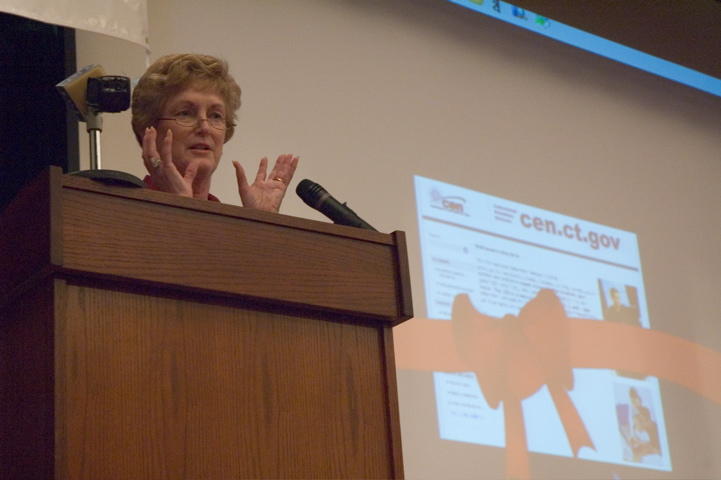
The purpose of the ribbon cutting was to announce the interconnection of all the entities with Internet2. Their site CEN (CT Education Network came online with the announcement. The CEN is America's first statewide K12 and higher education network built exclusively using state-of-the-art fiber optic connections.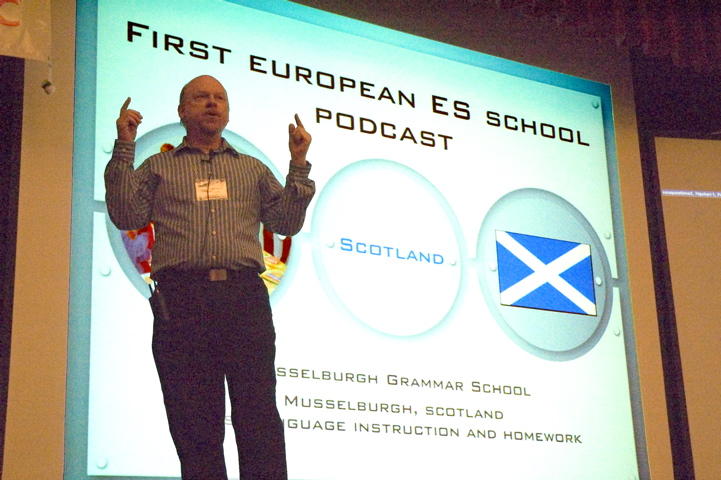
This (welcomed) event corresponded with my keynote at the 2005 CECA conference.
I can't wait to see what happens as a result of this truly amazing initiative.
Virtually every educator I met during my short time at the CECA conference was energized, focused and impressively innovative. The CECA conference was well run and a great example of how to do a state tech event.
Thursday, October 20, 2005
Classroom of My Dreams...
It's been YEARS since my friend Ted Roth and I stumbled through the inaugural "Scrapbook USA" activity on America Online. It was, I believe, one of the first widely supported collaborative writing exchanges using the "new medium" of AOL culminating in a live chat.
It's been YEARS since my buddy George Bagwell (Gwinnett County Schools, GA) and I trotted from school to school evangelizing PrintShop, HyperCard and MECC software on the districts first new Macintosh computers.
It's been YEARS since I wrote the first CNN NEWSROOM activity for Turner Educational Services - a set of activities to accompany a broadcast produced for classroom use.
It's been YEARS since I used DISK MUNCHER to copy 5.25" diskettes at swap meets in a tiny town in the middle of nowhere, GA. (Shortly thereafter I woke up and smelled the copyright.)
It's been YEARS since I first plugged my trusty Apple II into a Pioneer videodisc player and spun through a stunning set of images and movies in a Voyage of the Mimi adventure with my middle school Science class students.
It's been TOO MANY YEARS since I stumbled down the steps of the GRAD STUDIES building at the University of Georgia and dropped a set of punch cards. The very same set of cards (about 300 as I recall) that fed a program to the mainframe that crunched survey numbers for a survey I did on "Cassette-based storage systems in Education". (The Commodore PET was back in my dorm room.)
What hasn't changed though, are the wonderful feelings all those experiences brought me in working with technology and kids in the classroom. This year, I was invited back to keynote the most-wonderful CECA conference in Connecticut and in pulling together the latest and greatest, I realized that the classroom of MY dreams is back again - it's the benefit of hanging out with all the amazing educators I've had the pleasure to meet and talk with over all those years and listening to the NEW ideas that jump out of their ever-thinking heads each and every day. Without the visionary folks attending this CECA conference (and state conferences everywhere), our dreams, and those of our students, might be much further away.
Life is good. ;)
Bard
It's been YEARS since my buddy George Bagwell (Gwinnett County Schools, GA) and I trotted from school to school evangelizing PrintShop, HyperCard and MECC software on the districts first new Macintosh computers.
It's been YEARS since I wrote the first CNN NEWSROOM activity for Turner Educational Services - a set of activities to accompany a broadcast produced for classroom use.
It's been YEARS since I used DISK MUNCHER to copy 5.25" diskettes at swap meets in a tiny town in the middle of nowhere, GA. (Shortly thereafter I woke up and smelled the copyright.)
It's been YEARS since I first plugged my trusty Apple II into a Pioneer videodisc player and spun through a stunning set of images and movies in a Voyage of the Mimi adventure with my middle school Science class students.
It's been TOO MANY YEARS since I stumbled down the steps of the GRAD STUDIES building at the University of Georgia and dropped a set of punch cards. The very same set of cards (about 300 as I recall) that fed a program to the mainframe that crunched survey numbers for a survey I did on "Cassette-based storage systems in Education". (The Commodore PET was back in my dorm room.)
What hasn't changed though, are the wonderful feelings all those experiences brought me in working with technology and kids in the classroom. This year, I was invited back to keynote the most-wonderful CECA conference in Connecticut and in pulling together the latest and greatest, I realized that the classroom of MY dreams is back again - it's the benefit of hanging out with all the amazing educators I've had the pleasure to meet and talk with over all those years and listening to the NEW ideas that jump out of their ever-thinking heads each and every day. Without the visionary folks attending this CECA conference (and state conferences everywhere), our dreams, and those of our students, might be much further away.
Life is good. ;)
Bard
Monday, September 26, 2005
Palm Offers Windows Mobile
Who'd have thought this would happen? In a move akin to the recent Apple -> MacTel announcement, Palm, Inc. has made a deal with MSFT to offer Treo smartphones early next year running Windows Mobile. The partnership is just for Treos for now, but it offers an interesting choice for education administrators using Exchange and other networks.
Here's the release:
Palm and Microsoft Join to Bring the Palm Experience to Windows Mobile
SAN FRANCISCO, Sep 26, 2005 (BUSINESS WIRE) -- Verizon Wireless First to Market with New Treo Smartphone
Mobile-computing pioneer Palm, Inc. (Nasdaq:PALM) and software pioneer Microsoft Corp. (Nasdaq:MSFT) today announced a strategic alliance to accelerate the smartphone market segment with a new device for mobile professionals and businesses. Palm has licensed the Microsoft(R) Windows Mobile(R) operating system for an expanded line of Treo(TM) smartphones, the first of which will be available on Verizon Wireless' national wireless broadband network. The news was revealed in a press conference with Ed Colligan, president and chief executive officer of Palm, Inc.; Bill Gates, chairman and chief software architect of Microsoft Corp.; and Denny Strigl, president and chief executive officer of Verizon Wireless.
The collaboration gives customers more choices and marks a dedicated effort to deliver one of the world's most innovative smartphone solutions on the software platform favored by many businesses. Treo smartphones combine the hallmark Palm experience of a full-featured mobile phone with email, messaging, web access(1) and organizational software -- in an attractive, compact design. The new Treo smartphone takes advantage of the Windows Mobile 5.0 platform in multiple ways, offering Outlook Mobile, Office Mobile and Internet Explorer Mobile built into the smartphone, as well as direct access to Exchange Server 2003 for mobile access to information.(2) In addition, the new Treo will operate with Verizon Wireless' BroadbandAccess service, the largest high-speed wireless broadband network in the United States. Verizon Wireless expects the new Treo smartphone to be available to its customers in early 2006.
"We've long believed that the future of personal computing is mobile computing, and our collaboration with Microsoft is a historic step in delivering that vision to a larger market," said Colligan. "We're confident customers will see a differentiated smartphone that delivers our world-class usability on Microsoft's flexible and robust Windows Mobile operating system. We collaborated with Verizon Wireless first because of its high-speed wireless network and growing footprint of BroadbandAccess cities."
"This is a landmark alliance that will help businesses remain on the cutting edge of competitiveness," Gates said. "Demand for accessing information on mobile devices is soaring, and businesses want a low-cost, scalable solution. We're excited to team with Palm and Verizon Wireless to deliver a winning Windows Mobile solution that connects professionals to their critical information while on the go."
The Treo smartphone on Windows Mobile is a CDMA-based phone targeted for the U.S. market and takes advantage of Verizon Wireless' BroadbandAccess service on its EV-DO network with download speeds averaging 400-700 kilobits per second. Today, about half the U.S. population, in more than 84 metropolitan areas and in hundreds of airports across the nation, can access download speeds comparable to DSL or cable-modem connections. Verizon Wireless has been expanding its BroadbandAccess service area steadily since its debut in the fall of 2003.
"The new Treo smartphone running Windows Mobile will highlight the speed and power of our BroadbandAccess service," said Strigl. "The Treo will deliver fast downloading of email and attachments as well as quick access to critical-business information, providing businesses with a great return on investment. Our strong relationships with Microsoft and Palm continue to provide real value for our customers."
The new Treo smartphone is powered by an Intel processor and joins Palm's award-winning family of Treo smartphones, which includes the Treo 600 and Treo 650, both offered today to Verizon Wireless customers.
The Palm Experience on Windows Mobile
During the press conference, the companies demonstrated the Palm experience now brought to life on Windows Mobile. The audience saw a sampling of Palm's award-winning hardware design integrated thoughtfully with a rich Palm software suite, including the ability to:
-- Contact someone quickly from the Today Screen and choose between home, office or mobile numbers, or select email or SMS. With only two letters entered, a customer can find a record from among thousands of contacts;
-- Reach people most often called via photo speed dials visible as a band of images on the Today Screen;
-- Decline a call with a friendly SMS, signaling "In a meeting" or "Talking with the boss" instead of simply ignoring the call; and
-- Rewind, delete or fast-forward through work or cell phone voicemail with familiar and consistent on-screen icons.
Full product details will be disclosed when the product is available for purchase in early calendar 2006. No plans were revealed for additional mobile operators. Palm indicated that a Treo smartphone using Windows Mobile based on other wireless technologies was not anticipated to be released earlier than the second half of 2006.
About Palm, Inc.
Palm, Inc., a leader in mobile computing, strives to put the power of computing in people's hands so they can access and share their most important information. The company's products for consumers, mobile professionals and businesses include Palm(R) handheld computers, Palm Treo(TM) smartphones, Palm LifeDrive(TM) mobile managers, as well as software, services and accessories.
Palm products are sold through select Internet, retail, reseller and wireless operator channels throughout the world, and at Palm Retail Stores and Palm online stores (http://www.palm.com/store).
More information about Palm, Inc. is available at http://www.palm.com.
About Microsoft
Founded in 1975, Microsoft (Nasdaq:MSFT) is the worldwide leader in software, services and solutions that help people and businesses realize their potential.
About Verizon Wireless
Verizon Wireless owns and operates the nation's most reliable wireless network, serving 47.4 million voice and data customers. Headquartered in Bedminster, NJ, Verizon Wireless is a joint venture of Verizon Communications (NYSE:VZ) and Vodafone (NYSE and LSE: VOD). Find more information on the Web at www.verizonwireless.com. To preview and request broadcast-quality video footage and high-resolution stills of Verizon Wireless operations, log on to the Verizon Wireless Multimedia Library at www.verizonwireless.com/multimedia.
NOTE: A replay and podcast of the press conference will be available starting at approximately 12 p.m. Pacific from the following links:
-- Webcast: www.microsoft.com/presspass
-- Podcast: www.microsoft.com/winme/0509/25267/SFO_Press_Conference.xml
Broadcast Video and Other Materials
Video and photographs will be available from several sources, including the following:
-- Palm's Multimedia Library (www.palm.com/MultimediaLibrary). Preregistration is required to access broadcast-quality video and stills.
-- Microsoft's press room (www.microsoft.com/presspass).
-- Verizon Wireless' Multimedia Library (www.verizonwireless.com/multimedia). Preregistration is required to access broadcast-quality video and stills.
-- Cameras are permitted on-site -- an audio mult-box will be provided.
-- For broadcast coordinates and inquiries, contact mediarelations@wctv.com or 212.445.8220.
CAUTIONARY STATEMENT FROM PALM: This press release contains forward-looking statements within the meaning of the federal securities laws, including, without limitation, statements regarding the smartphone market and the timeframe in which new products will be available. These statements are subject to risks and uncertainties that could cause actual results and events to differ materially, including, without limitation, the following: Palm's ability to forecast demand for its products; Palm's ability to introduce new products and services successfully and in a cost effective and timely manner; Palm's ability to timely and cost-effectively obtain components and elements of its technology from suppliers; Palm's dependence on wireless carriers and ability to meet wireless carrier certification requirements. A detailed discussion of these and other risks and uncertainties that could cause actual results and events to differ materially from such forward-looking statements is included in Palm's most recent filings with the Securities and Exchange Commission, including its Annual Report on Form 10-K for the fiscal year ended June 3, 2005. Palm undertakes no obligation to update forward-looking statements to reflect events or circumstances occurring after the date of this press release.
(1) Within wireless service coverage area only. Email, messaging and web access requires data services at an additional cost. ISP may also be required.
(2) Requires Exchange Server 2003 and access enabled by IT administrator.
Palm, Treo and LifeDrive are among the trademarks or registered trademarks owned by or licensed to Palm, Inc. Microsoft and Windows Mobile are either registered trademarks or trademarks of Microsoft Corp. in the United States and/or other countries. All other brand and product names are or may be trademarks of, and are used to identify products or services of, their respective owners.
SOURCE: Palm
Palm
Sandy O'Halloran, 408-617-7639 (Investor Relations)
sandy.ohalloran@palm.com
Marlene Somsak, 408-617-7451 (Media Relations)
marlene.somsak@palm.com
Jimmy Johnson, 408-617-7456(Media Relations)
jimmy.johnson@palm.com
or
Weber Shandwick for Microsoft
Chris Elliott, 425-452-5389
celliott@webershandwick.com
or
Verizon Wireless Corporate Communications
Jeffrey Nelson, 917-968-9175
jeffrey.nelson@verizonwireless.com
Brenda Boyd Raney, 908-872-7152
brenda.raney@verizonwireless.com
Here's the release:
Palm and Microsoft Join to Bring the Palm Experience to Windows Mobile
SAN FRANCISCO, Sep 26, 2005 (BUSINESS WIRE) -- Verizon Wireless First to Market with New Treo Smartphone
Mobile-computing pioneer Palm, Inc. (Nasdaq:PALM) and software pioneer Microsoft Corp. (Nasdaq:MSFT) today announced a strategic alliance to accelerate the smartphone market segment with a new device for mobile professionals and businesses. Palm has licensed the Microsoft(R) Windows Mobile(R) operating system for an expanded line of Treo(TM) smartphones, the first of which will be available on Verizon Wireless' national wireless broadband network. The news was revealed in a press conference with Ed Colligan, president and chief executive officer of Palm, Inc.; Bill Gates, chairman and chief software architect of Microsoft Corp.; and Denny Strigl, president and chief executive officer of Verizon Wireless.
The collaboration gives customers more choices and marks a dedicated effort to deliver one of the world's most innovative smartphone solutions on the software platform favored by many businesses. Treo smartphones combine the hallmark Palm experience of a full-featured mobile phone with email, messaging, web access(1) and organizational software -- in an attractive, compact design. The new Treo smartphone takes advantage of the Windows Mobile 5.0 platform in multiple ways, offering Outlook Mobile, Office Mobile and Internet Explorer Mobile built into the smartphone, as well as direct access to Exchange Server 2003 for mobile access to information.(2) In addition, the new Treo will operate with Verizon Wireless' BroadbandAccess service, the largest high-speed wireless broadband network in the United States. Verizon Wireless expects the new Treo smartphone to be available to its customers in early 2006.
"We've long believed that the future of personal computing is mobile computing, and our collaboration with Microsoft is a historic step in delivering that vision to a larger market," said Colligan. "We're confident customers will see a differentiated smartphone that delivers our world-class usability on Microsoft's flexible and robust Windows Mobile operating system. We collaborated with Verizon Wireless first because of its high-speed wireless network and growing footprint of BroadbandAccess cities."
"This is a landmark alliance that will help businesses remain on the cutting edge of competitiveness," Gates said. "Demand for accessing information on mobile devices is soaring, and businesses want a low-cost, scalable solution. We're excited to team with Palm and Verizon Wireless to deliver a winning Windows Mobile solution that connects professionals to their critical information while on the go."
The Treo smartphone on Windows Mobile is a CDMA-based phone targeted for the U.S. market and takes advantage of Verizon Wireless' BroadbandAccess service on its EV-DO network with download speeds averaging 400-700 kilobits per second. Today, about half the U.S. population, in more than 84 metropolitan areas and in hundreds of airports across the nation, can access download speeds comparable to DSL or cable-modem connections. Verizon Wireless has been expanding its BroadbandAccess service area steadily since its debut in the fall of 2003.
"The new Treo smartphone running Windows Mobile will highlight the speed and power of our BroadbandAccess service," said Strigl. "The Treo will deliver fast downloading of email and attachments as well as quick access to critical-business information, providing businesses with a great return on investment. Our strong relationships with Microsoft and Palm continue to provide real value for our customers."
The new Treo smartphone is powered by an Intel processor and joins Palm's award-winning family of Treo smartphones, which includes the Treo 600 and Treo 650, both offered today to Verizon Wireless customers.
The Palm Experience on Windows Mobile
During the press conference, the companies demonstrated the Palm experience now brought to life on Windows Mobile. The audience saw a sampling of Palm's award-winning hardware design integrated thoughtfully with a rich Palm software suite, including the ability to:
-- Contact someone quickly from the Today Screen and choose between home, office or mobile numbers, or select email or SMS. With only two letters entered, a customer can find a record from among thousands of contacts;
-- Reach people most often called via photo speed dials visible as a band of images on the Today Screen;
-- Decline a call with a friendly SMS, signaling "In a meeting" or "Talking with the boss" instead of simply ignoring the call; and
-- Rewind, delete or fast-forward through work or cell phone voicemail with familiar and consistent on-screen icons.
Full product details will be disclosed when the product is available for purchase in early calendar 2006. No plans were revealed for additional mobile operators. Palm indicated that a Treo smartphone using Windows Mobile based on other wireless technologies was not anticipated to be released earlier than the second half of 2006.
About Palm, Inc.
Palm, Inc., a leader in mobile computing, strives to put the power of computing in people's hands so they can access and share their most important information. The company's products for consumers, mobile professionals and businesses include Palm(R) handheld computers, Palm Treo(TM) smartphones, Palm LifeDrive(TM) mobile managers, as well as software, services and accessories.
Palm products are sold through select Internet, retail, reseller and wireless operator channels throughout the world, and at Palm Retail Stores and Palm online stores (http://www.palm.com/store).
More information about Palm, Inc. is available at http://www.palm.com.
About Microsoft
Founded in 1975, Microsoft (Nasdaq:MSFT) is the worldwide leader in software, services and solutions that help people and businesses realize their potential.
About Verizon Wireless
Verizon Wireless owns and operates the nation's most reliable wireless network, serving 47.4 million voice and data customers. Headquartered in Bedminster, NJ, Verizon Wireless is a joint venture of Verizon Communications (NYSE:VZ) and Vodafone (NYSE and LSE: VOD). Find more information on the Web at www.verizonwireless.com. To preview and request broadcast-quality video footage and high-resolution stills of Verizon Wireless operations, log on to the Verizon Wireless Multimedia Library at www.verizonwireless.com/multimedia.
NOTE: A replay and podcast of the press conference will be available starting at approximately 12 p.m. Pacific from the following links:
-- Webcast: www.microsoft.com/presspass
-- Podcast: www.microsoft.com/winme/0509/25267/SFO_Press_Conference.xml
Broadcast Video and Other Materials
Video and photographs will be available from several sources, including the following:
-- Palm's Multimedia Library (www.palm.com/MultimediaLibrary). Preregistration is required to access broadcast-quality video and stills.
-- Microsoft's press room (www.microsoft.com/presspass).
-- Verizon Wireless' Multimedia Library (www.verizonwireless.com/multimedia). Preregistration is required to access broadcast-quality video and stills.
-- Cameras are permitted on-site -- an audio mult-box will be provided.
-- For broadcast coordinates and inquiries, contact mediarelations@wctv.com or 212.445.8220.
CAUTIONARY STATEMENT FROM PALM: This press release contains forward-looking statements within the meaning of the federal securities laws, including, without limitation, statements regarding the smartphone market and the timeframe in which new products will be available. These statements are subject to risks and uncertainties that could cause actual results and events to differ materially, including, without limitation, the following: Palm's ability to forecast demand for its products; Palm's ability to introduce new products and services successfully and in a cost effective and timely manner; Palm's ability to timely and cost-effectively obtain components and elements of its technology from suppliers; Palm's dependence on wireless carriers and ability to meet wireless carrier certification requirements. A detailed discussion of these and other risks and uncertainties that could cause actual results and events to differ materially from such forward-looking statements is included in Palm's most recent filings with the Securities and Exchange Commission, including its Annual Report on Form 10-K for the fiscal year ended June 3, 2005. Palm undertakes no obligation to update forward-looking statements to reflect events or circumstances occurring after the date of this press release.
(1) Within wireless service coverage area only. Email, messaging and web access requires data services at an additional cost. ISP may also be required.
(2) Requires Exchange Server 2003 and access enabled by IT administrator.
Palm, Treo and LifeDrive are among the trademarks or registered trademarks owned by or licensed to Palm, Inc. Microsoft and Windows Mobile are either registered trademarks or trademarks of Microsoft Corp. in the United States and/or other countries. All other brand and product names are or may be trademarks of, and are used to identify products or services of, their respective owners.
SOURCE: Palm
Palm
Sandy O'Halloran, 408-617-7639 (Investor Relations)
sandy.ohalloran@palm.com
Marlene Somsak, 408-617-7451 (Media Relations)
marlene.somsak@palm.com
Jimmy Johnson, 408-617-7456(Media Relations)
jimmy.johnson@palm.com
or
Weber Shandwick for Microsoft
Chris Elliott, 425-452-5389
celliott@webershandwick.com
or
Verizon Wireless Corporate Communications
Jeffrey Nelson, 917-968-9175
jeffrey.nelson@verizonwireless.com
Brenda Boyd Raney, 908-872-7152
brenda.raney@verizonwireless.com
Saturday, August 06, 2005
New Book in the works...
I'm just finishing my newest book.. this one is a follow up to ISTE's bestselling “Palm Handheld Computers: A Complete Resource for Classroom Teachers”.
It's called "Handheld Computers and Smartphones in Secondary Schools: A Hands-On Guide". It features lots of tips and tricks, and some lessson plans, for using handhelds in the high school curriculum.
Besides that, it was great fun to write!
It'll be available this Winter from ISTE.
More info coming soon here...
It's called "Handheld Computers and Smartphones in Secondary Schools: A Hands-On Guide". It features lots of tips and tricks, and some lessson plans, for using handhelds in the high school curriculum.
Besides that, it was great fun to write!
It'll be available this Winter from ISTE.
More info coming soon here...
Wednesday, July 27, 2005
Podcast or bust...
At first, I thought Podcasting would be just hype. Like lots of other technologies, this seems a flash-in-the-pan fad.
I was wrong.
I've now become addicted to this "audio equivalent" of a blog. I regularly listen to "digested" NPR news, corporate news from MSFT, Apple, Palm and others, education reports - you name it.
Here's the best site I've found about how to create a PODCAST of your own...
Enjoy!
I was wrong.
I've now become addicted to this "audio equivalent" of a blog. I regularly listen to "digested" NPR news, corporate news from MSFT, Apple, Palm and others, education reports - you name it.
Here's the best site I've found about how to create a PODCAST of your own...
Enjoy!
Thursday, June 09, 2005
Smartphone AOL
I'm not sure, but I think something's wacky when your smartphone is logged into AOL 24/7.
AOL's new AOL 3.3 for Treo 650 allows you to do just that. Eating data minutes like PacMan, the software is designed to give you AIM and email access all the time - wherever you are.
I've tried it and the IMs seem to arrive while I'm on the phone. The phone calls arrive while I'm answering email. The email arrives when I'm sending IMs.
Sometimes too much communication is not so good. :)
AOL Software is available at: http://mymobile.aol.com/portal/pda/index.html
(if you MUST!)
AOL's new AOL 3.3 for Treo 650 allows you to do just that. Eating data minutes like PacMan, the software is designed to give you AIM and email access all the time - wherever you are.
I've tried it and the IMs seem to arrive while I'm on the phone. The phone calls arrive while I'm answering email. The email arrives when I'm sending IMs.
Sometimes too much communication is not so good. :)
AOL Software is available at: http://mymobile.aol.com/portal/pda/index.html
(if you MUST!)
Subscribe to:
Posts (Atom)